
We have released Antelope Launcher version 3.4.1. This update introduces the following new features and changes:
1. Apple Silicon Native Support
Users with Apple Silicon Macs can now run the Antelope Launcher natively, without Rosetta. Please note that native support is available only when updating from Launcher version 3.3.26. If you update from an older version, the Launcher will continue to run as an Intel application through Rosetta. If you have already updated to version 3.4.1 from a version older than 3.3.26, please download the latest version and reinstall the Launcher.
2. New “Analog Mics” Tab
A new Analog Mics tab has been added to the Launcher, allowing you to manage your analog microphones.
The new tab includes:
Microphone Registration – Register your microphone directly through the Antelope Launcher without having to use the User Area.
Edge 360 Calibration Files – Download your individual Edge 360 calibration file.
Native Microphone Emulations – Install available native microphone emulations.
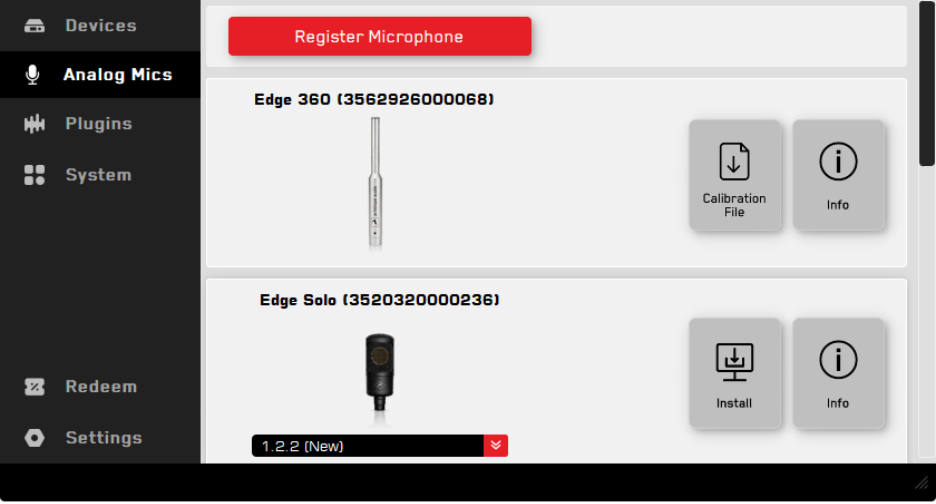
Please note that only one Edge 360 calibration file can be stored on your computer at a time. If you own multiple Edge 360 microphones, downloading a new calibration file will overwrite the previously stored calibration file.
IMPORTANT !!
3. macOS Mojave and Catalina Are Not Supported
Antelope Launcher 3.4.1 is NOT compatible with macOS Mojave 10.14 and macOS Catalina 10.15.
If your computer is running either of these operating systems, do not install this update. Please continue using your current version of the Antelope Launcher.
If you have updated by accident, you can revert back by downloading and installing manually the latest compatible version 3.3.25 .